
Part of the guide: The Complete Guide to Inspection Reports: Structure, Evidence, Sign-off and Examples
Below is a free inspection report template for Microsoft Word: a cover with the property, client, inspector and licence, a scope and limitations section, a summary table, one block per finding with room for a photo, closing remarks and a sign-off table. It is a plain .docx, so it also opens in Pages and Google Docs. Download it, put your logo in the header, and save a copy as your master.
Inspection report template (.docx)
Free. Cover, scope and limitations, summary of findings, a finding block to copy for each item, closing remarks and sign-off. US Letter, Calibri, no macros.
Download the Word file (.docx)What is in the template
The order is the one clients read in: who and what, what was and was not looked at, the summary, then the detail. Someone who only reads the first two pages should still know what has to be done and by whom.

- Cover table: property or site, client, inspector with company and licence or membership number, date and time, report reference and revision, weather and access.
- Scope and limitations: what you inspected, the method, and what you did not inspect and why.
- Summary of findings: one row per finding with reference, location, short title, severity, responsible party and due date.
- Finding blocks: location, photo, observation, why it matters, recommendation, severity, responsible party and status.
- Closing remarks and sign-off: the overall condition in two or three sentences, then names, roles, signatures and dates.
How to fill it in
- Cover: fill it on site before you start, while the client is there to confirm names and access.
- Scope: write it before the findings. "Roof viewed from the ground with binoculars" and "crawl space not entered, no access hatch" protect you and tell the reader where the report stops.
- Findings: copy the finding block once per item. Give each a short title built as element, defect, location: "Shower tray sealant missing, main bathroom".
- Summary: fill it last, from the finding titles, most severe first.
- Closing remarks and sign-off: what must happen before handover or closing, the re-inspection date, then the signatures.
What a report must contain can also be set from outside. Many US states license home inspectors and adopt a standard of practice listing the systems to report on, and professional associations such as InterNACHI and ASHI publish their own. The template gives the structure; your state's rules and your own standard decide the minimum content.
Writing findings people act on
A finding gets fixed when the reader can find it, understands why it matters and knows who should act. Compare:
- Weak: "Crack in wall."
- Useful: "Diagonal crack, about 2 mm wide and 600 mm long, running from the top left corner of the bedroom 2 door frame. Typical of settlement movement. Recommend monitoring with a crack gauge for three months and assessment by a structural engineer if it widens."
Measure instead of describing: millimetres, inches, how many, how long. Say why it matters in one line: water entry, safety, durability or appearance. Keep the recommendation to what should be achieved and who should do it; how to do it is the trade's job. More examples are in how to write a construction defect report.
Photos without a 40 MB file
- Two photos per finding: one wide shot that locates it, one close-up that shows it. See how to photograph defects.
- Insert at a fixed width, around 9 cm, so every finding looks the same.
- Compress before you send: in Word, select a photo, then Picture Format, Compress Pictures, apply to all pictures at 150 ppi. Keep the full-size originals in the job folder.
Word or PDF
Word is for drafting and for agreeing wording with a client who wants to comment. The version you issue should be a PDF: the layout cannot shift, the file opens the same on any phone, and it is a clean record of what was sent. In Word, File, Save As, PDF, or File, Export.

When the template starts to slow you down
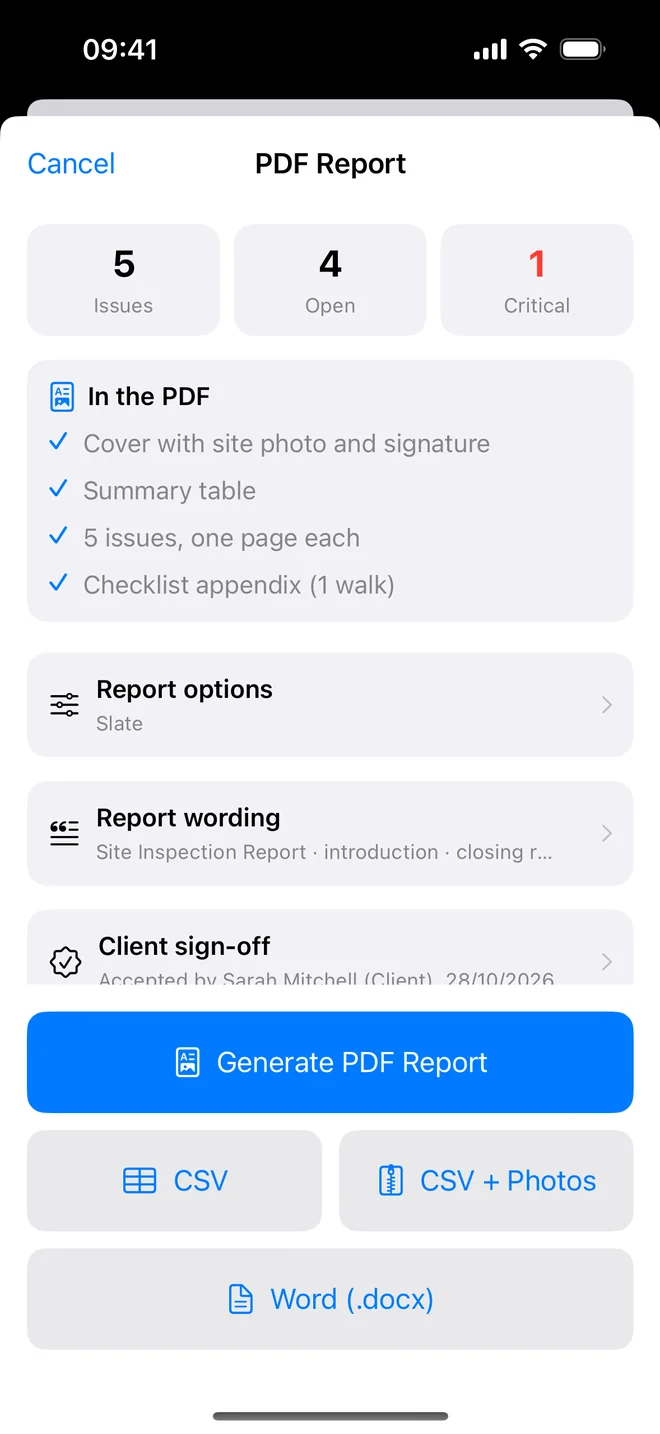
A Word template works well for a handful of findings. Past twenty or thirty, most of the time goes into copying blocks, resizing photos and renumbering. That is the point where a field app pays for itself: the photo goes into the finding as you take it, the numbering and the summary table build themselves, and the report comes out at the end of the visit.
Punch List AI drafts each finding from the photo, then produces the report as a PDF with ten themes and three layouts, and on Pro as an editable Word file with the photos and signatures in place, for the clients who want to edit.
What to do next
Download the template, add your logo and company details to the header, fill the scope section with the limits you always state, and save it as your master copy. Use it for your next inspection exactly as it is; change it only once you know what your clients ask about.
Skip the copy and paste
Free to download. Photo, draft finding, report: PDF on every plan, Word on Pro.
Download on theApp StoreQuestions people ask
Is the inspection report template free?
Yes. Download the .docx, adapt it and use it for your own reports. No sign-up.
Does the template open in Google Docs or Pages?
Yes. It is a standard .docx with no macros, so Word, Google Docs, Pages and LibreOffice open it.
How do I add my logo?
Double-click the top margin in Word to open the header, insert your logo, and save the file as your master copy.
Should I send the report as Word or PDF?
Draft in Word if the client wants to comment, then issue the final version as a PDF and keep that file as the record.